Overview
 TRVCamera component works with cameras: searches, configures, receives a video stream, saves or plays a video file.
A video received by TRVCamera can be displayed in  TRVCamView or
  TRVCamMultiView components. The camera movement is controlled by
  TRVCamControl component or by the viewer itself.
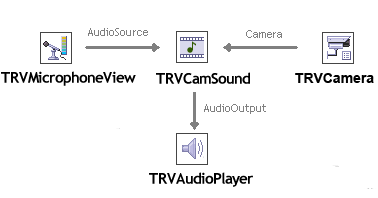
If you need to play or record sound from video, use  TRVCamSound component (it helps TRVCamera to read sound from video) and
  TRVAudioPlayer (it plays sound or records it to a file).
If you need to record video to a file, use  TRVCamRecorder component.
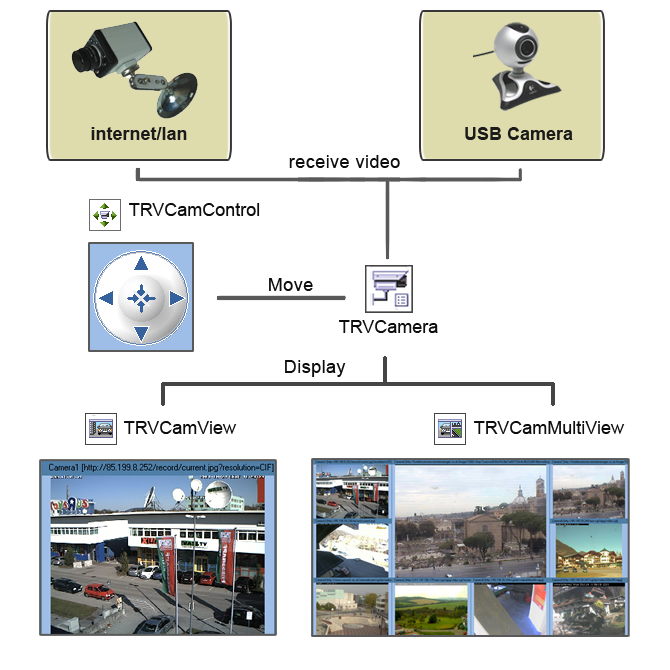
How the components are linked (video)
The components are linked using CameraControl and VideoSource properties:
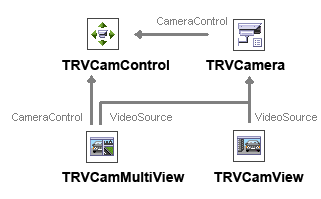
How the components are linked (audio)
Sound from video: the components are linked using Camera, AudioSource, and AudioOutput properties:
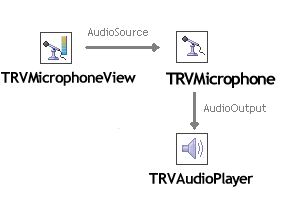
Sound from audio capture device (microphone): the components are linked using AudioSource, and AudioOutput properties: